Alarming
What you will find in this section:
Alarming
The device can monitor upper and lower thresholds for up to 4 freely configurable parameters and can issue an alarm if a limit value is exceeded.
|
Navigation on the web server |
Menu: “Functional Settings, Alarming" |
|
Status |
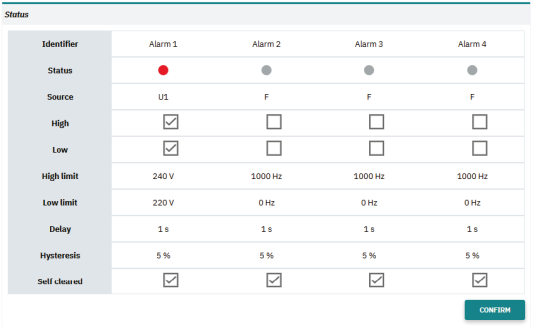
The “Status” area shows the current status of the alarms. |
|
Settings |
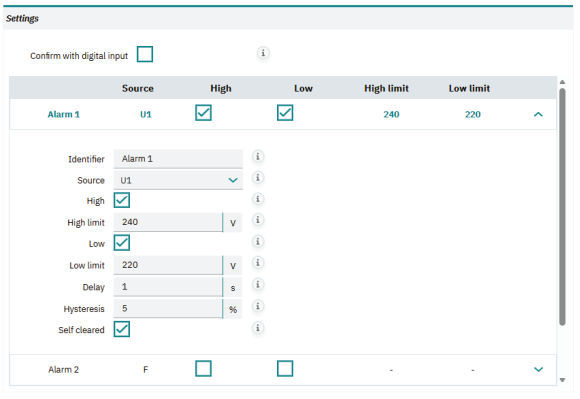
Set the alarm according to your requirements. |
|
Confirm with digital input |
You can use the checkbox to define that manual acknowledgement of an alarm is required. The acknowledgement is performed via the digital input, which has to be configured for this purpose. |
|
Identifier |
The identifier can be used to assign a user-specific designation to the alarms. |
|
Alarm 1…4 |
You can use the four tabs to define the alarm configuration for each alarm. |
|
Source |
Select the measurement value to be monitored. |
|
High limit and low limit |
Use the checkbox to select the monitoring function. Depending on which function you selected, enter the value to be monitored. The unit of the threshold corresponds to the unit of the measured value (specified in the register table, V, A, Hz, °, W, var, VA, Wh, varh, VAh) |
|
Delay |
Enter the tripping delay for the alarm in seconds. |
|
Hysteresis |
For the switching threshold, a hysteresis in percent is required. Enter it here. |
|
Self-cleared |
With this checkbox, you can define that the alarm self-acknowledges after the normal status has been restored. This way, no manual acknowledgement is required. The integrated logic gate enables multiple use of the digital output for the alarm function. |
Acknowledgment of alarms
Self-cleared - activated
In most applications, configured alarms that occur in the event of an error in the application are self-acknowledging. After the error status has been restored to the normal status (operation) of the applications, the alarm message disappears again.
Self-cleared - deactivated
You can save an error status in the application until it is manually reset via the digital input, a communication interface or the "confirm" button.
Related topics